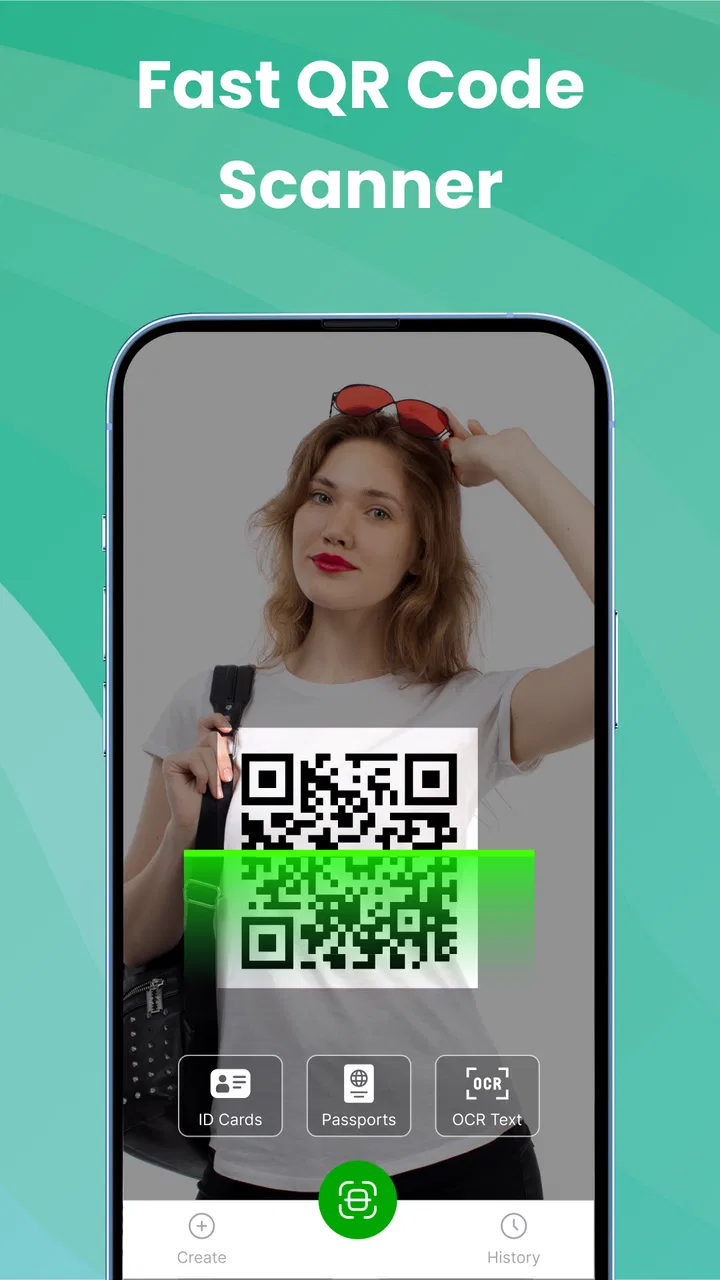
QR Scanner, All Barcode Scan
- 3.6
- Rating
- 500.00K
- Installs
- Free
- Price

 Analysis by App-foxy
I tend to judge a scanning app by what happens in the few seconds after I point the camera at something. Does it recognize the code quickly, show the result clearly, and let me continue without making a simple task feel complicated? QR Scanner, All Barcode Scan takes that straightforward approach. It is a free productivity app from Studio Rankvn for reading QR codes and barcodes, while also giving me a way to create QR codes of my own.
That sounds simple, and in daily use that is mostly the point. I would not choose it as a full document-management tool or a specialist inventory system. I see it as a practical utility for moments when a code is printed on packaging, displayed on another phone, attached to a product, or used to open information quickly. Its usefulness depends less on a long feature list than on whether it fits naturally into those small interruptions in the day.
How the scanner fits into connected everyday tasks
A QR code often acts as a doorway rather than the destination. Scanning a restaurant menu, event check-in page, product information label, payment instruction, or shared contact card may only take a moment, but the next step usually needs an internet connection. This is where the experience should be understood carefully: the app can help read the visual code, while the content behind that code may still depend on the network.
You May Also Like

 Blood Strike: 2.5 Anniversary
Blood Strike’s Loadouts Turn Every Drop Into a Tactical Gamble
A close look at Blood Strike’s custom loadouts: how fast access to signature weapons reshapes its battle royale rhythm, rewards preparation, and narrows the gap between fights.

 Pandora - Music & Podcasts
Pandora’s Music Is Easy to Start, but Harder to Recover
Pandora’s strength is its low-effort path from a seed to a station. Its weak spot is how much confidence it asks you to place in connection, setup, and quiet recovery.

 8 Ball Pool
 Is Built on Rivalries, Rematches, and Routine
A close look at the rivalries, rematches, shared routines, and unanswered safety questions that turn a quick pool match into a persistent mobile community.

 Samsung Music
’s Quiet Strength Is Playing What You Already Own
Its reach comes less from spectacle than from dependable access to a personal library. That simplicity is both the app’s strongest retention engine and its ceiling.

 AccuWeather: Weather Radar
AccuWeather Review: A Quick, Clear Forecast for Everyday Decisions
For everyday plans, the best forecast is the one you can understand quickly. AccuWeather makes rain timing, radar, and local conditions easy to act on, with a few trade-offs.

 Hill Climb Racing
Why Hill Climb Racing Still Turns Crashes Into One More Run
A tiny car, a bumpy hill and one more upgrade: Hill Climb Racing keeps resurfacing because its simple chaos makes every near-miss feel personal.
More From Our News Desk
View All News


In my experience with this kind of tool, the most useful habit is to separate those two stages. First, let the camera recognize the pattern. Then look at the destination before opening it. If the code points to a web page, the page may load slowly in a weak-signal area, fail in airplane mode, or show content that has changed since the code was printed. That is not necessarily a scanner problem, but it affects how useful the whole process feels.
This distinction matters when someone expects a scan to work as a complete offline solution. I would use the app confidently for reading a code in a place with uncertain reception, but I would not assume that every linked service will remain available without connectivity. The scanner is the first step; the destination controls much of what happens afterward.
The same thinking applies to QR creation. Creating a code can be useful for sharing a short piece of information or directing someone to a destination, but the quality of the result depends on what is encoded. A simple text message is different from a web address that may later become unavailable. Before sharing a generated code widely, I would test it from another phone and check that the encoded information is exactly what I intended.
That small test is one of the most practical ways to avoid trouble. It catches typing mistakes, missing characters, and links that open somewhere unexpected. A QR code can look perfectly normal even when its content is wrong, so visual confidence is not enough. The app makes creation convenient, but I still consider verification part of the workflow.
Where it feels most useful on a phone
The app makes the most sense in mobile situations where carrying out a quick scan is easier than manually entering a long string of characters. A printed web address, a product identifier, or a shared QR image can be tedious to type, especially when the characters are easy to confuse. Pointing the camera at the code reduces that friction.
A realistic example is receiving a delivery and wanting to inspect a barcode on the box before putting it away. I can open the scanner, aim at the label, and see whether the code is readable without reaching for a separate computer. Another example is joining a service from a poster or screen in a public place. Rather than switching between apps and typing an address, scanning keeps the process in one short action.
It is also handy when one phone displays a QR code and another phone needs to read it. This situation is often more reliable than trying to photograph a reflective printed label because the screen can be held at a comfortable angle and brightness. I would still avoid placing the phone too close at first; giving the camera a little distance often makes it easier to frame the entire code.
For people who regularly handle receipts, packaging, printed instructions, or event materials, the value is cumulative. None of these tasks is dramatic, but removing repeated manual entry makes a small utility worth keeping. The app’s productivity category is appropriate because it saves time in short bursts rather than serving as a tool I would use continuously for hours.
There is a useful trade-off here. A dedicated scanner can feel more focused than opening a general camera application, especially when I want a clear code-reading workflow. On the other hand, many modern phones already recognize QR codes through their built-in camera. If your phone does that consistently and you only scan occasionally, installing another app may not add much.
I would therefore recommend this app more strongly to someone who wants a separate QR and barcode utility, or whose normal camera experience is inconsistent. I would be less enthusiastic for a person who only needs to scan a code once every few months and already has reliable recognition built into the phone.
Reading results when the connection is weak
Connectivity changes the meaning of a successful scan. A code can be recognized while the linked page remains unreachable. In that situation, I would first check whether the result itself is visible as text, then decide whether opening it immediately is necessary. If the destination is not urgent, copying or noting the result before moving to a stronger connection can be more sensible than repeatedly refreshing a failed page.
This is particularly relevant in underground stations, crowded venues, large stores, and rural areas. A scan that leads to a web page may appear to fail when the real issue is signal quality. I prefer to wait a moment, reposition the phone, and try once more rather than assuming the printed code is defective. If the code is displayed on another screen, reducing glare and increasing the screen’s brightness can also help the camera distinguish its edges.
When scanning a physical barcode, lighting is just as important as connectivity. Glossy packaging can reflect overhead lights and create bright patches across the pattern. Tilting the item slightly, moving away from direct glare, and keeping the code within the camera frame are simple adjustments that often matter more than repeatedly tapping the screen.
These are not glamorous features, but they are the difference between a utility that stays installed and one that gets deleted after a frustrating attempt. A good scanner should make the first try easy, yet the user still benefits from knowing whether the obstacle is the code, the camera view, or the network destination.
Recovering from unsuccessful scans
Not every code is equally readable. A tiny code printed on a curved bottle, a damaged label, a dim display, or a screenshot with compression artifacts can all make recognition harder. My first recovery step would be to frame the whole code without cutting off the corners. QR patterns use their surrounding structure, so zooming too aggressively or cropping part of the image can work against recognition.
Next, I would stabilize the phone and adjust the distance instead of relying only on digital zoom. Autofocus needs a clear view, and moving back slightly can give it more room to settle. If the code is on a screen, I would also remove any strong reflection and avoid photographing it at a sharp angle.
If repeated attempts fail, I would compare the same code with another scanner or the phone’s built-in camera. That is a useful diagnostic rather than an automatic criticism of this app. If both tools fail, the printed code may be damaged or poorly generated. If another tool succeeds immediately, then I know this particular situation is better handled by the alternative.
Barcode scanning has a different limitation from QR scanning. A barcode may identify a product or record, but the information shown afterward can depend on the service receiving that value. An app can correctly read the pattern and still not provide the detailed product information someone expected. I would not mistake a successful read for a guarantee of a complete product database or a rich lookup result.
That is an important expectation for shoppers and small sellers. If I only need the encoded number, a scanner can be enough. If I need stock management, batch tracking, price synchronization, or a searchable catalog, I would choose a dedicated inventory or retail application instead. QR Scanner, All Barcode Scan is better viewed as the capture point, not a complete business system.
Using it without wasting mobile data
Although scanning itself is a brief camera task, the next action may open an online destination. I would be selective about opening unfamiliar codes immediately, especially when using mobile data. A QR code can lead to a page with images, downloads, or other content that consumes more data than the code-reading step suggests.
My preferred routine is to scan, inspect the result, and open it only when I recognize the destination or genuinely need it. This is useful on limited plans and also reduces the chance of following a misleading or unwanted link. A code should not receive automatic trust simply because it is printed on a professional-looking card or poster.
For code creation, data awareness means choosing the smallest useful payload. If I am sharing a short text instruction, encoding only that instruction is cleaner than sending someone through several unnecessary redirects. If I am creating a web link, I would check the address carefully and consider whether the destination is likely to remain available for the lifetime of the printed code.
There is another practical reason to keep generated codes simple: they are easier to test and explain. A recipient can scan a concise code and understand what it is meant to do. Long or complicated content may still be valid, but it gives me more opportunities to make a typing error and more reason to verify the result before printing or sharing it.
Privacy also deserves a moment of attention. I would avoid encoding sensitive information into a QR code unless I fully understand where it will be displayed and who can scan it. A code on a public notice is effectively visible to anyone with a camera. The app can make creation quick, but it cannot make public sharing private.
What the current release tells me
Studio Rankvn presents this as a free app, which makes trying it low-risk for someone who wants a dedicated scanner. It is rated for Everyone, so its basic positioning is broad and accessible rather than aimed at a specialist audience. The current version is 1.2.0, and the app requires Android 8.0 or newer, a requirement that excludes older devices but still covers many phones in everyday use.
Its reach is already substantial, with over half a million installs. The average rating sits at 3.6 from around 270 ratings, which feels more mixed than a universally polished utility. I would read that as a reason to test it with the exact codes I care about rather than assuming it will outperform every alternative. A scanner’s real value can vary greatly depending on camera quality, lighting, code size, and the user’s expectations.
The free entry point is appealing, but in-app purchases range from $4.99 to $49.99 per item. That makes it worth checking the app’s purchase prompts before committing to a regular workflow. Someone who only needs occasional scanning may find the free experience sufficient, while a frequent user should understand which functions might lead toward paid options and whether those functions are necessary.
I would not install it solely because it claims to handle both QR codes and barcodes. Many competing tools offer the same broad capability, and built-in camera recognition may already cover basic QR use. The stronger reason to try this app is convenience: having a focused place for quick scans and personal QR creation can be worthwhile if those tasks appear often in your routine.
Who should choose it, and who should look elsewhere
I think it suits students scanning classroom materials, travelers opening printed information, shoppers checking labels, and anyone who regularly receives QR codes on another screen. It can also help a small seller who needs to read codes occasionally but does not need a full warehouse or point-of-sale system.
I would be more cautious about recommending it to businesses that need dependable high-volume scanning, shared records, automated inventory updates, or detailed reporting. Those needs call for a specialized solution with a database and workflow controls, not simply a camera-based reader. Likewise, a person who expects every barcode to reveal rich product details may be disappointed when the result is only the encoded value or when the next lookup depends on an online service.
Users with older Android phones should check compatibility before planning around it, since Android 8.0 is the minimum operating system. People who are highly sensitive to in-app purchase prompts should also approach the free label with attention rather than assuming every possible function is included without charge.
Compared with the usual alternatives, the built-in camera is the fastest option when it recognizes codes reliably and avoids installing anything extra. A dedicated barcode database app is better when product information is the main goal. A business scanner is superior for stock control. This app occupies the middle ground: more focused than a general camera, but much lighter than a professional management tool.
My connectivity verdict
After looking at the way scanning, code creation, and online destinations fit together, I see QR Scanner, All Barcode Scan as a useful small utility rather than an all-purpose answer. Its best moments are quick and practical: point the phone at a code, read what is encoded, and decide what to do next. The app can remove the annoyance of manual typing, but it cannot guarantee that an external page will load or that a barcode will lead to detailed information.
My advice is to test it with several real examples before making it your default scanner. Try a printed QR code, a code on a screen, and a product barcode in different lighting. Then create a simple QR code and scan it from another device. Those tests reveal more about whether it fits your phone and habits than a generic feature list can.
The free download, broad age rating, and modest system requirement make it approachable, while the mixed average rating and possible in-app purchases are reasons to keep expectations realistic. The key trade-off is convenience versus capability: it is convenient for everyday capture and creation, but it is not a replacement for a complete online lookup, inventory, or business platform.
For me, that is a fair role. If I wanted a focused QR and barcode reader that I could keep ready for ordinary mobile tasks, I would give it a try. If my priority were offline certainty, deep product databases, advanced records, or heavy commercial scanning, I would choose a more specialized alternative. The app is at its best when I treat it as the first step in a connected workflow, not as the entire workflow itself.
FAQs for QR Scanner, All Barcode Scan
01What features does QR Scanner, All Barcode Scan offer?
QR Scanner, All Barcode Scan provides a comprehensive set of features including quick scanning of QR codes and barcodes, support for various barcode formats, and the ability to generate QR codes. It also allows users to save scanned codes and share them easily. Additionally, it offers a history log for easy access to previously scanned codes.
02Is QR Scanner, All Barcode Scan free to use?
The app is available for free with basic features. However, it may offer in-app purchases or subscriptions to access premium features, such as ad-free usage, enhanced scanning capabilities, or additional customization options. Users can download the app from the Google Play Store or Apple App Store to explore the pricing details.
03How does QR Scanner, All Barcode Scan ensure user privacy?
QR Scanner, All Barcode Scan prioritizes user privacy by not storing personal data or scanned content on its servers unless explicitly shared by the user. The app operates locally on your device, and any data collected is used solely to improve the app's functionality. Users are encouraged to review the app's privacy policy for detailed information.
04Is an internet connection required to use QR Scanner, All Barcode Scan?
An internet connection is not necessary for basic scanning and generating QR codes. However, certain features, such as accessing online content linked to a QR code or downloading app updates, will require an internet connection. Users can enjoy offline scanning for most standard use cases.
05What should I do if QR Scanner, All Barcode Scan is not working properly?
If you encounter issues while using QR Scanner, All Barcode Scan, first ensure that your device’s camera is functioning properly and that you have granted the necessary permissions. Restarting the app or your device can also help. If problems persist, checking for updates or contacting customer support through the app may resolve the issue.
Pros
- Fast and accurate scanning.
- Supports multiple barcode formats.
- User-friendly interface.
- No intrusive ads.
- Works offline.
Cons
- Limited customization options.
- Occasional scanning errors.
- No batch scanning feature.
- Requires camera access.
- No cloud integration.

QR Scanner, All Barcode Scan
Gallery